Factored AI
By Sergio Polimante, Senior ML Engineer, MLOps
If you’ve built data pipelines on Databricks, you have likely lived through:
- Collaboration conflicts: An analyst wants to implement a new feature and edits a notebook that belongs to another team member. The other analyst is not aware of the changes. The modification introduces confusion and eventually breaks the original analyst's scheduled pipelines.
- No version history: The dashboard pipeline the entire organization depends on is currently running from a notebook owned by an analyst who left months ago. No one knows where the source code lives or how the workflow is configured, so it will need to be rebuilt from scratch.
- Breaking what users depend on: A small update, intended to improve data quality, breaks a dashboard that executives use every morning. The team learns about it from an escalation, not from monitoring.
- No tests to prevent regressions: A schema change on a table or a fix in a function resolves one dashboard issue, but silently breaks other dependent resources. The developer does not notice until a downstream pipeline fails, or worse, when executives question the accuracy of a report.
These are not edge cases. They are the default experience for data teams without DataOps.
Building a Data Product V.S. Operating One
Behind every one of those pain points lies a single, fundamental tension: building a feature and making it reliably available to users are two completely different problems.
Data teams excel at the first part. Writing transformations, building models, crafting dashboards. That is the work most data engineers and scientists are trained for and enjoy. But the operational side, getting that work into production safely, keeping it running, recovering from failures, deploying changes without breaking downstream consumers, and doing all of this repeatedly with a team of people making changes at the same time, is usually overlooked.
The result is predictable: production is fragile, deployments carry hidden risk, and every change is a source of uncertainty. The details of how a solution is deployed live in individual developers' knowledge, not in the company's institutional operations.
This is a process gap. Software engineering solved this problem years ago with DevOps: a set of practices that bridge development and operations through automation, version control, and continuous delivery. The same principles apply to data pipelines. When we apply DevOps practices to data architectures, we call it DataOps. And it works just as well for Spark jobs as it does for web services.
Understanding the Concepts and Components Of A DataOps Toolkit
DataOps is a set of practices, each one directly addressing a specific problem from the opening. Here is how the core concepts map back to those pain points:
1. Separated Environments (dev / staging / prod) Each environment is an isolated Databricks workspace. What you build in development never touches production data. A broken pipeline in dev stays in dev. Changes move from dev to staging to production only when they have been validated at each step.
Solves: breaking things users depend on.
2. Version Control (Git) Every change to every notebook, configuration file, and pipeline definition is a commit. Who changed it, when, and why is always traceable. Rolling back is a git revert away.
Solves: collaboration conflicts and the "which version is in production" question.
3. Infrastructure as Code Pipelines, cluster configurations, schedules, and permissions are defined as YAML files rather than configured through the UI manually. The same versioning practices that apply to your code now apply to your workflow structure and definitions. The same definition deploys identically across every environment. There are no undocumented manual tweaks that exist only in production. Changes to the workflow follow the same operational path and rigor as your code. This also makes it possible to remove human input from deployments entirely. Your staging and production environments become free of manual intervention, eliminating that category of risk.
Solves: manual deployment risk, environment drift between dev and prod.
4. CI/CD Pipelines Every time code is merged to a branch, it is automatically tested and deployed to the corresponding environment: development, staging, or production. No one needs to click "deploy." Pull requests become the change management process. Every deployment has a commit hash, a PR description, and an author attached to it. This provides full traceability and a clear, auditable process for both code and workflow changes.
Solves: uncontrolled releases and manual deployment errors.
5. Automated Testing Catch regressions before they reach production. Two types matter most:
- Unit tests: Validate individual transformation logic in isolation. Does this function handle nulls correctly? Does this aggregation produce the expected output on known input? These run anywhere in seconds: locally, in a CI/CD runner, in a notebook.
- Integration tests: Validate that your code works end-to-end with real dependencies: Unity Catalog, Spark, external APIs, ML models. These are the tests that catch the column-rename cascade failure before it reaches production.
Together, these practices transform pipelines from fragile workflows into reliable systems.
Solves: cascading regressions and late defect discovery.
Declarative Automation Bundles: The Rocket That Delivers Your Code
Think of your deployment process as a rocket launch.
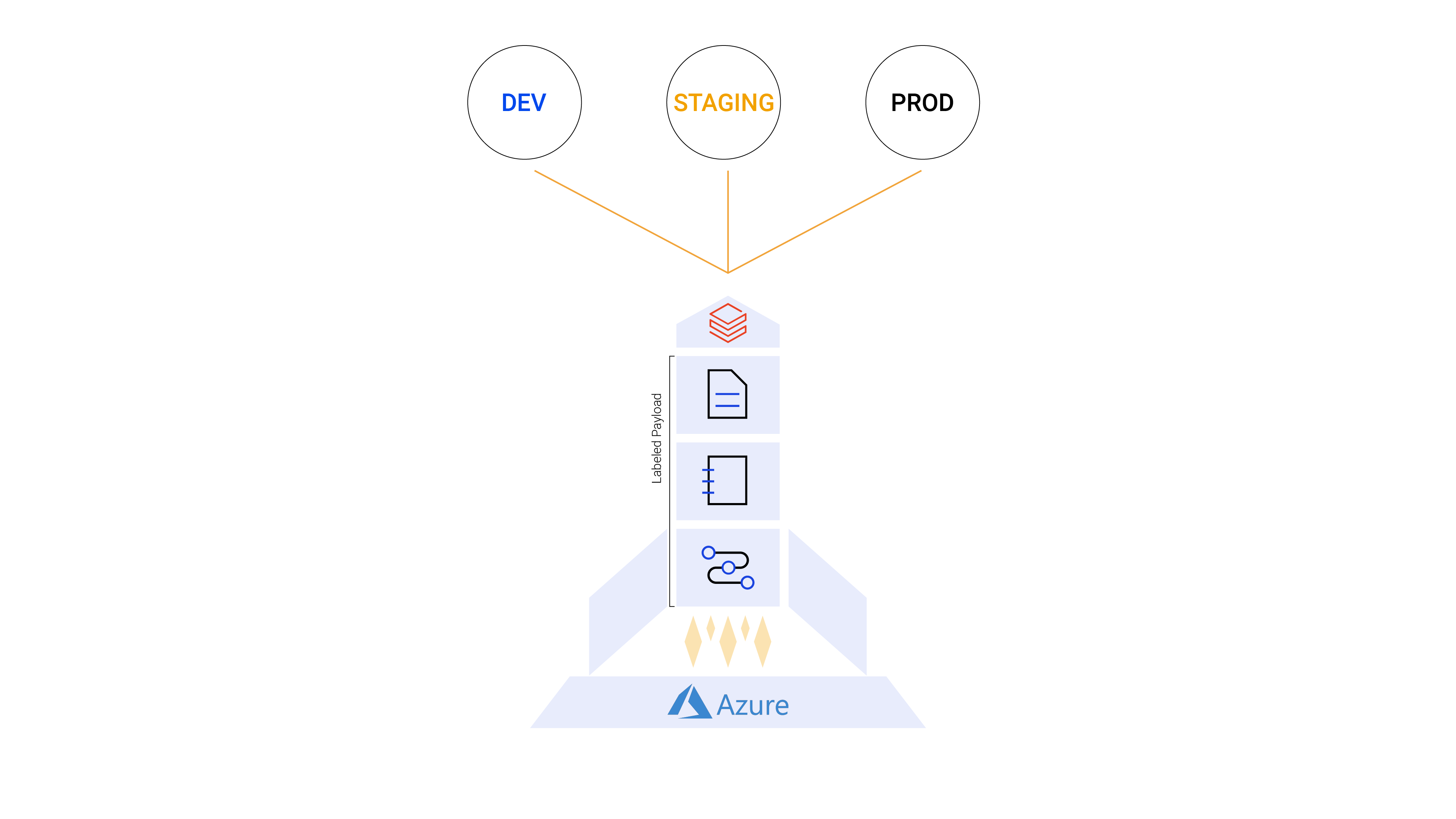
- The Rocket = Declarative Automation Bundle. The structure that packages all of your project's code and configuration into a single deployable unit and transports it from environment to environment. It is the vehicle.
- The Launch Tower = CI/CD Pipeline (Azure Pipelines, GitHub Actions, GitLab CI, Jenkins, and others). The infrastructure that triggers the launch, monitors the flight, and confirms delivery.
- The Payload = Your project files. Notebooks, Python files, workflow definitions, tests. Everything the pipeline needs to run.
- The Planets = Target environments (DEV, STAGING, PROD). Each a separate Databricks workspace with its own configuration, permissions, and data.
Declarative Automation Bundles (formerly Databricks Asset Bundles, or DABs) are Databricks' native Infrastructure-as-Code framework, available in Databricks CLI v0.200+. A bundle is a directory in your Git repository containing your source code and a small set of YAML configuration files. When you run databricks bundle deploy, it deterministically syncs everything to your target workspace. The following sections walk through each key file.
File 1: resources/*.yml: Infrastructure as Code for Your Pipeline
This file is the code representation of your Lakeflow Job (formerly Databricks Workflows). Every task, every dependency, every cluster configuration, every schedule, written as versioned YAML instead of UI clicks.
Notice the ${var.catalog} and ${var.schema} references. These are variables that resolve differently per target environment. The same YAML deploys to dev, staging, and production with the correct catalog and schema for each, without a single line of duplication.
Beyond Lakeflow Jobs, DABs support Lakeflow Declarative Pipelines (formerly Delta Live Tables), dashboards, model serving endpoints, MLflow experiments, and registered models, all definable as code in the same bundle.
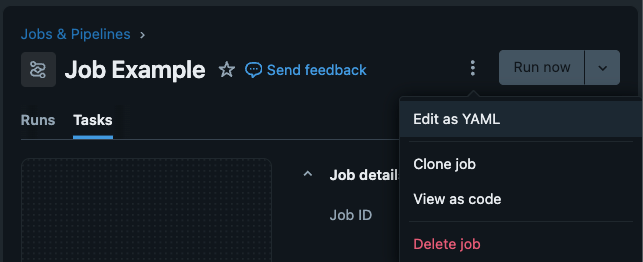
Recommendation: You do not need to write this YAML from scratch. To get started quickly, you can create your workflow in the Databricks UI first, then click the kebab menu (⋮) next to "Run now" and select "Switch to code version (YAML)". You will see the complete YAML definition of your job. Copy it into your resources/ folder as your starting point. No CLI knowledge required.
File 2: databricks.yml
This is the root bundle configuration file. It is the layer between your project code and Databricks: it defines workspace connections, target environments, variables, and permissions. This is where environment separation actually happens: same code, different targets.
The mode: development setting is subtle but powerful: it automatically prefixes every resource name with the deploying engineer's username. For example, [dev] sergio.polimante My Project Pipeline. Twenty engineers can each deploy their own version of the same bundle into a shared workspace without stepping on each other.
File 3: azure-pipelines.yml
This is the CI/CD configuration that automates the launch. The example uses Azure Pipelines, but the exact same pattern works with GitHub Actions, GitLab CI, Jenkins, and Bitbucket Pipelines, all supported with service principal authentication.
Pull requests automatically deploy to staging for review. Merges to main deploy to production. Rollbacks are a git revert and a pipeline run. No manual intervention is required.
File 4: Notebooks and Source Code
These are the notebook and Python files that your resource YAMLs execute. There is no paradigm shift here. If you are already building pipelines on Databricks, you already know how to write notebooks. The bundle simply adds version control and deployment awareness around the files you are already writing. Your notebooks live in the repository alongside your YAML files, and the bundle syncs them to the workspace on every deploy.
At this point, your pipeline (source files and workflow structure) follows established software engineering practices for operations: reducing friction from development to deployment, making the process faster, more reliable, scalable, and standardized across your team.
Integration Testing on Databricks
Deploying code reliably is only half the problem. The other half is knowing, before it reaches production, whether the code actually works with the data, services, and infrastructure it will encounter there. That is where testing comes in, and where this article takes you further in rigor and quality.
Unit Tests
Unit tests validate individual transformation logic in isolation: a function that cleans a date column, a helper that computes revenue, a filter that removes duplicates. They run with pure Python and pytest, no Databricks dependencies. They run in seconds in any CI/CD runner and should be part of every pull request check.
Integration Tests
Integration tests are where things get complicated. In theory, they validate that your code works end-to-end with real dependencies: Unity Catalog tables, Spark execution, MLflow model registries, external APIs, vector search indexes. In practice, these dependencies cannot be meaningfully replicated in a lightweight CI/CD runner container. Mocking a Spark session is not the same as running against a real cluster with your real data schema.
Most data engineering teams do not run traditional integration tests. Instead, they validate the output: the tables the pipeline produces. They check that schemas are correct, primary keys are unique, values fall within expected ranges, row counts make sense, and timestamps are fresh. On Databricks, expectations in Lakeflow Declarative Pipelines make this native to the pipeline definition itself. Outside Databricks, tools like Great Expectations and Soda serve the same purpose. This is a practical and widely adopted approach: verify what the pipeline produced, not how it ran.
For teams that do want true integration tests, like exercising code paths against real Spark, real Unity Catalog, real MLflow, the challenge remains: it is not straightforward to spin up a Databricks environment inside a Docker container on a CI/CD agent. The best approach is to deploy a test job to the workspace itself, so the tests run where the dependencies actually live.
The Insight: Run Tests Where the Dependencies Live
If your integration tests need Databricks to run correctly, deploy them to Databricks and run them there.
We solved this by including a dedicated test workflow inside every project bundle. When a project is deployed, it automatically creates a {project_name}_test_job Lakeflow Job alongside the production job. This test job runs inside the Databricks cluster, where Unity Catalog, Spark, MLflow, dbutils, and all other dependencies are natively available.
This approach aligns with what the Databricks engineering team calls workflow-based integration testing (see Integration Testing for Lakeflow Jobs with Pytest and Databricks Connect by Taras Chaikovskyi, December 2025). We have been running this pattern in production since mid-2024, before that post was published, and it has held up well as the team and pipeline count grew.
Build for Scale
What makes our implementation distinctive is the centralization layer. Every test job across all projects and all teams calls the same central test notebook from a shared test_suite project. Engineers do not configure testing infrastructure per project. They add test files to designated folders and the framework handles the rest.
The execution follows three phases:
Phase 1: Create mock data. The test job creates temporary tables in Unity Catalog, populated with controlled, known data. These tables mirror the schema of production tables but contain only what is needed to validate the pipeline logic.
Phase 2: Run pytest and report. The central test notebook executes pytest against the project's test files. Coverage reports are generated and pushed to SonarQube for centralized quality tracking across all teams.
Phase 3: Clean up. Temporary mock tables are dropped. The cluster state is clean for the next run.
Twenty engineers across five teams follow this exact workflow on every project, without any per-project test setup. There is no "how do I configure testing?" question during onboarding. It is already there, built into the bundle template.
For teams that prefer running tests locally or directly in the CI/CD runner, the Databricks Connect approach with databricks-labs-pytester is a solid alternative (Approach 2 in the Taras Chaikovskyi post).
Business Impact at Scale
We use Declarative Automation Bundles as the backbone of our DataOps practice across multiple engagements. The metrics below come from this framework deployed at scale:
- Over 5 teams were onboarded to a shared DataOps framework,
- More than 20 engineers actively using Declarative Automation Bundles in their daily production workflows.
- Together, they have deployed over 100 production data pipelines through bundle-based CI/CD.
- Since adoption, there have been zero major incidents.
- Deployment time dropped from hours of manual UI configuration to minutes of automated CI/CD, and engineer onboarding time was reduced from days to hours.
The zero-incident figure ensured that by the time a change reaches production, it has been validated in development, deployed to staging, tested by integration tests running inside the Databricks cluster, reviewed in a pull request, and approved by a human. The blast radius of any mistake is bound by the process.
The onboarding improvement is the one that compounds over time. When a new engineer joins a project, the entire context (infrastructure definitions, deployment pipeline, test suite, and environment configurations) is in the repository. They clone it, configure their credentials, and run databricks bundle deploy --target development. They are contributing in hours, not days. When a new project needs to be created, a single command, databricks bundle init company-custom-bundle, generates the complete repository with all of the company's institutional operation definitions already in place: CI/CD pipelines, testing infrastructure, environment configuration, and standardized project structure.
There Is No Setup From Scratch
Factored uses these practices in production, at scale, today.