Granting access to data is technically simple. A single GRANT statement may be enough to give a user or group permission to query a table. Governing that decision across a growing organization, however, is considerably more difficult.
As companies become more data-driven, their metastores expand alongside the number of users, teams, and data products they support. Without clear ownership and an auditable process, permission management fragments and the consequences extend beyond security and compliance. When an organization cannot easily determine who has access to its data, why that access was granted, who approved it, or even who owns the underlying asset, governance itself becomes an operational bottleneck: data consumers wait for access, data owners remain disconnected from decisions about their own assets, and platform engineers spend time coordinating permissions instead of improving the platform.
Effective governance is not about ruling a metastore with an iron fist. It is about establishing guardrails that allow the right people to make access decisions without sacrificing security, accountability, or productivity. This is the challenge Argus was designed to address.
Access Control Is More Than GRANT and REVOKE
Granting a permission is generally the final technical step of an access-request process. Before that command can be executed, a consumer must identify the required dataset, determine who owns it, select the appropriate principal and level of access, explain the business need, obtain authorization, and wait for the permission to be applied. Although the resulting GRANT may take only seconds, everything leading up to it can leave users blocked for days.
Without a defined workflow, these requests become scattered across private messages, emails, and ticketing systems. Even when the correct owner is eventually found and the permission is granted, the business decision may remain hidden inside a conversation. Unity Catalog audit logs can show which privilege changed, who performed the action, and when it occurred, but a direct permission event does not necessarily preserve the complete justification and approval context. Reconstructing the decision can therefore require information from several systems.
Many organizations respond by centralizing every request within the Data Platform team. This can provide consistency in smaller environments, but it becomes increasingly difficult to sustain as the number of teams, datasets, and requests grows. Platform engineers become the operational queue for the entire metastore locating owners, validating approvals, executing repetitive changes, and answering status questions while consumers wait. The problem is not the performance of an individual engineer; it is a process that depends on a small group to coordinate every decision and execute every change.
Data owners are better positioned to decide whether access is appropriate, while the Data Platform team is better positioned to define how approved access should be enforced safely. A scalable process should therefore decentralize access decisions while preserving centralized, controlled enforcement.
Unity Catalog, Native Access Requests, and a Moving Platform
Unity Catalog provides the foundation for this model. It centralizes ownership and access control across catalogs, schemas, tables, and other securable objects while supporting users, groups, and service principals as principals. Privileges granted at the catalog or schema level can inherit to child objects, and ownership provides a clear way to assign responsibility for governed resources. Combined with audit logs, these capabilities provide both an enforcement layer and a record of how access is administered.
Unity Catalog has also expanded beyond these foundational controls. Its native Request for Access feature allows consumers to request privileges from Catalog Explorer, notebooks, the SQL editor, AI/BI dashboards, and Genie. Requests can be routed through email, Slack, Microsoft Teams, webhooks, or redirect URLs. The workflow can also resolve configured destinations, validate prerequisite privileges such as USE CATALOG and USE SCHEMA, and allow authorized users to grant privileges directly or add the requester to an existing group.
The timing of this functionality matters. Self-service access-request destinations entered Public Preview in August 2025, while metastore-level enablement, inherited destinations, and broader owner-based routing arrived in June 2026. The native workflow was not a static baseline: it continued evolving while custom solutions to the same organizational problem were being designed and developed. This convergence validates the problem by showing that access discovery, routing, approval, and auditability have become first-class Unity Catalog concerns.
For organizations whose requirements are satisfied by the native workflow, Request for Access should be the default choice. It is integrated into the platform and avoids the cost of maintaining a custom application. Other organizations, however, may require ownership of the operational request data, custom access abstractions, organization-specific lifecycle states, controlled processing schedules, specialized notification rules, or separation between recording approval and executing privileged changes. Unity Catalog supports this extensibility through webhooks and redirect destinations for external access-management systems.
The arrival of these native capabilities changed the position of Argus, but not the problem it was designed to solve. Rather than replacing Unity Catalog's access-request functionality, Argus demonstrates how an organization can build an opinionated and extensible governance workflow around Unity Catalog when its operational requirements extend beyond the native path.
Argus: An Owner-Driven Access Workflow
Argus is a data access portal built natively on Databricks to transform Unity Catalog permission changes into a structured, owner-driven workflow. Through a Databricks App, consumers can select the resources they need, request access on behalf of a group, and provide the business context behind the request. Argus identifies the relevant data owner, routes the request for review, and records its status and resulting decision in a Delta table governed by Unity Catalog.
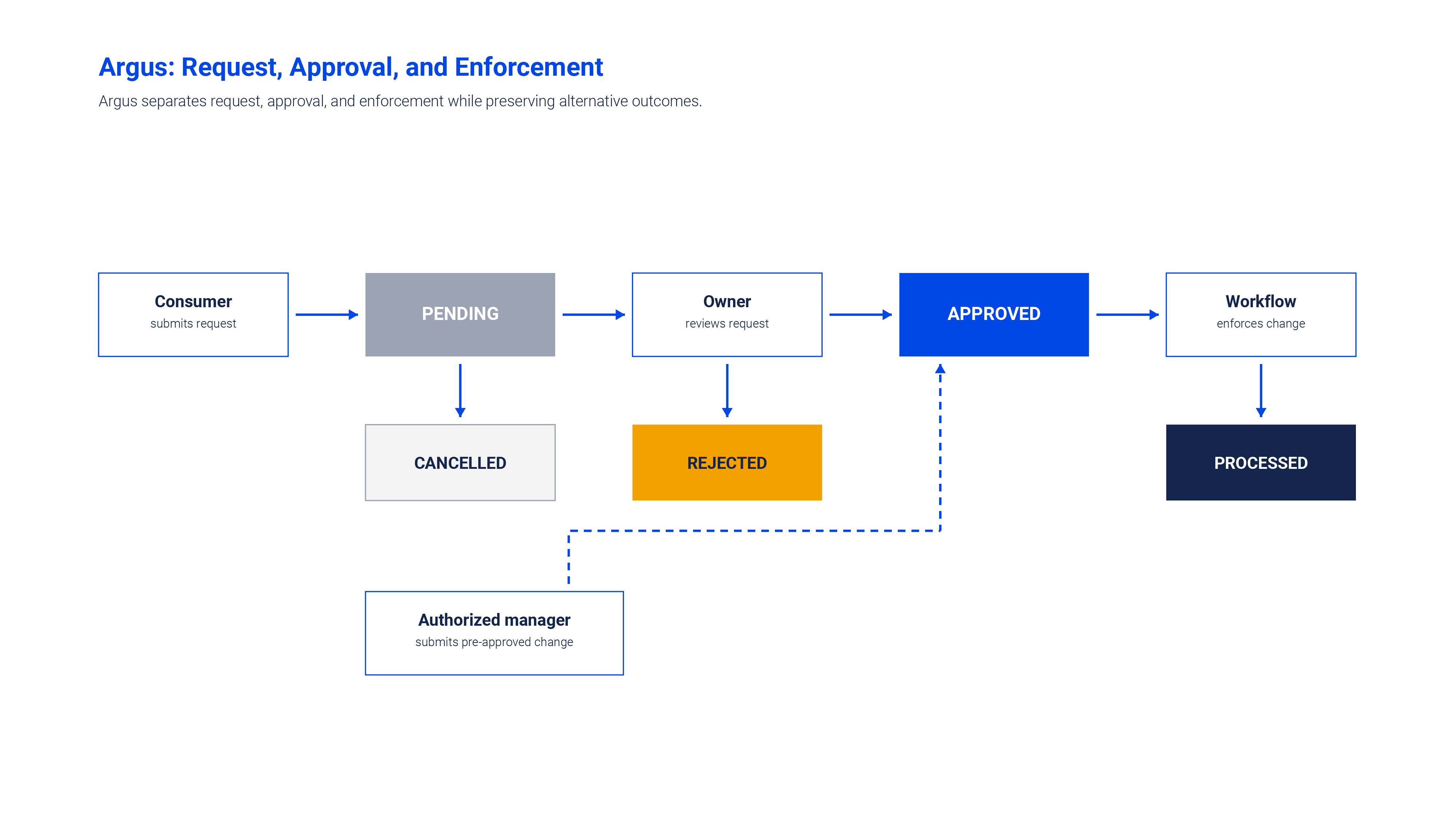
Once a request is approved, the application does not apply the permission directly. A separate Databricks Workflow processes approved requests and executes the corresponding GRANT or REVOKE statements, so Unity Catalog remains the source of truth for enforcement while Argus manages the organizational process surrounding it.
From Request to Enforcement
Argus begins by identifying the signed-in user through Databricks Apps. The requester's email is populated automatically, and the group selector is limited to groups to which that user belongs. This keeps the consumer experience focused on the identities they can legitimately represent.
The consumer selects a catalog and, when needed, a schema or table; chooses GRANT or REVOKE; selects an application-level READ, EDIT, or MANAGE access profile; and provides a business justification. The platform team controls how those profiles map to Unity Catalog privileges. Argus resolves the owner of each resource and lets the consumer stage several objects before submission. Although the objects are submitted together, Argus persists one request row per object so that different owners can review their portions independently.
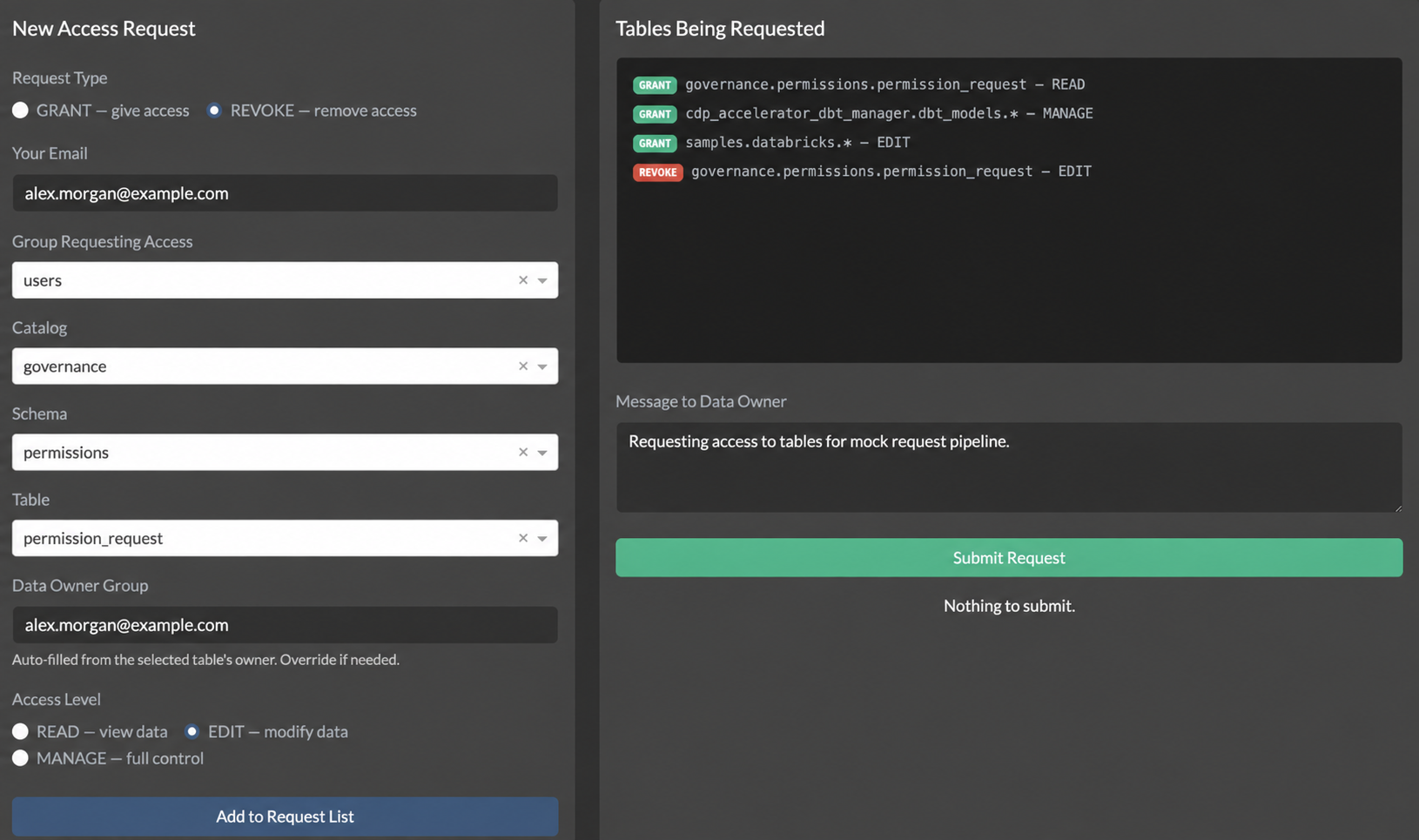
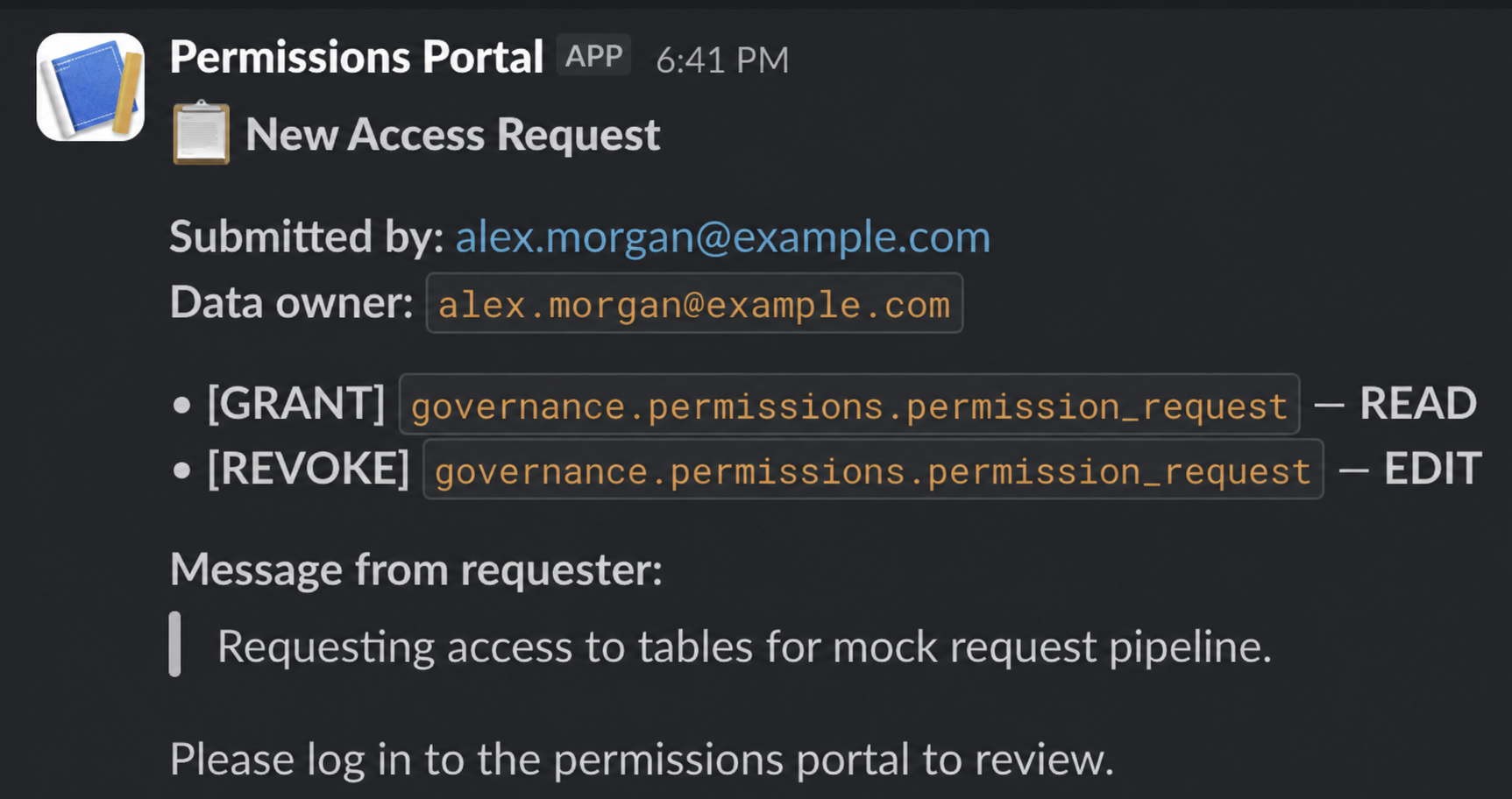
At submission, each row enters PENDING and Argus notifies the resolved owner through the configured Slack, Microsoft Teams, or email route. The permission_request table preserves the object path, target group, request type, requested access profile, requester, owner, justification, timestamp, and current status.
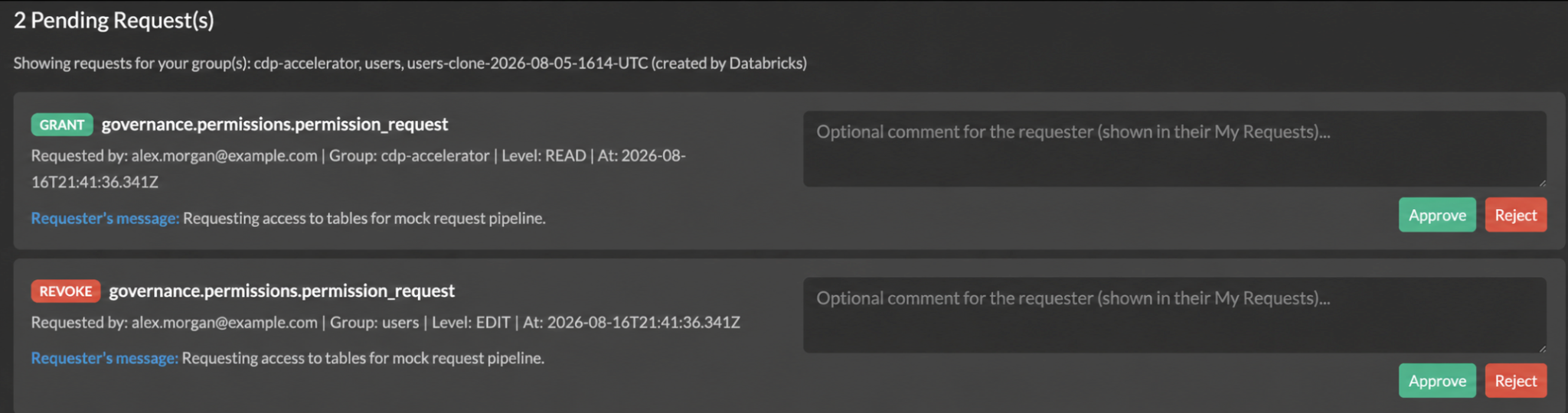
A request appears in Pending Approvals for users authorized to manage the target resource. An owner or another authorized manager can approve or reject it and may record a decision comment. The requester can also cancel a pending request that is no longer needed. Approval changes the request to APPROVED; it does not immediately modify Unity Catalog. Because enforcement is deferred to the scheduled run, this window is also reversible: the requester or an authorized manager can still cancel an approved request that has not yet been processed, moving it to CANCELLED before any privilege changes.
A scheduled Databricks Workflow reads APPROVED rows, translates their access profiles into the corresponding Unity Catalog GRANT or REVOKE statements, and, after successful execution, marks each request PROCESSED and records its processing time.
Throughout the lifecycle, consumers use My Requests to view pending, approved, rejected, cancelled, and processed requests together with any decision comments. Authorized managers can also register pre-approved changes through Manage Permissions; Argus records those changes as approved and routes them through the same controlled processing path. The Data Platform team defines the profiles, schedule, and execution guardrails, while auditors can query the operational history alongside Unity Catalog audit logs.
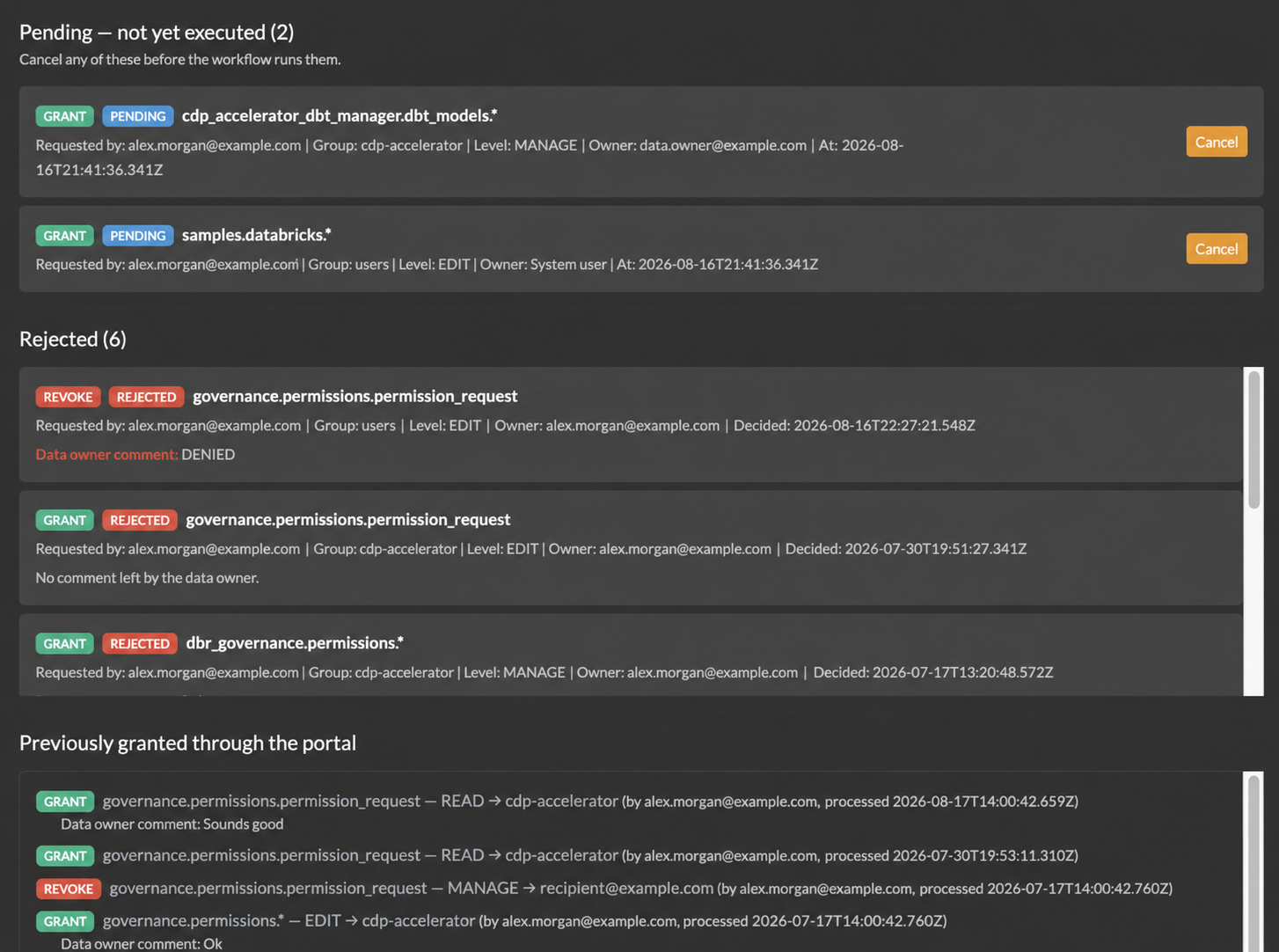
Together, the request form, approval queue, operational table, and processing workflow create a traceable chain from business justification to effective permissions in Unity Catalog.
Inside Argus: Identity, State, and Execution Boundaries
Argus is intentionally split across three execution boundaries: an interactive Databricks App, an operational Delta table, and a privileged Databricks Workflow. The application authenticates users, resolves metadata, collects requests, and records decisions. The request table persists the lifecycle of each operation, while the workflow is the only component that translates approved intent into Unity Catalog permissions. This is a security boundary as much as an architectural one: the component exposed to users does not need the authority required to change permissions across the governed data estate.
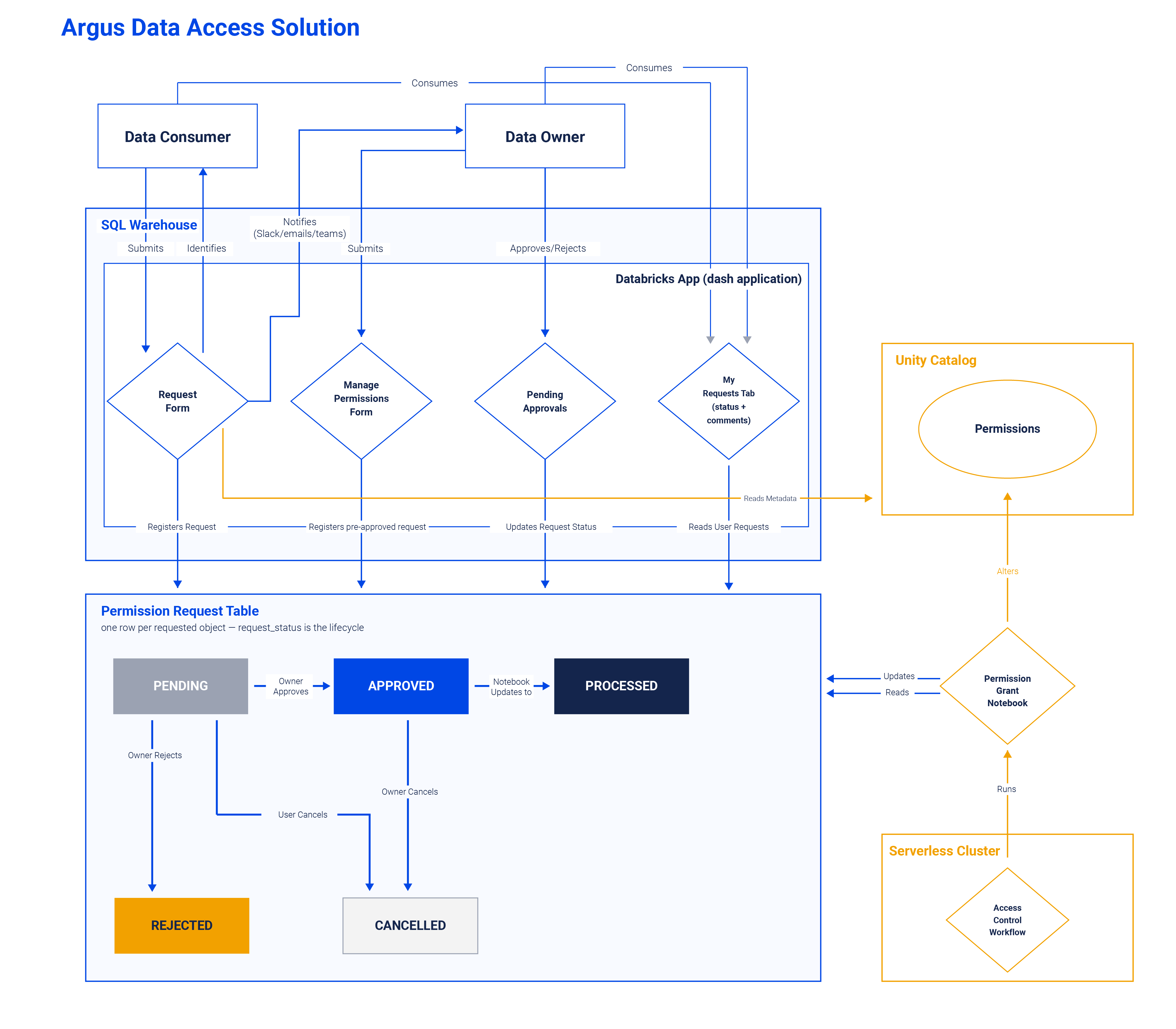
Identity and Authorization
Databricks Apps supports two complementary authorization models: the application's own identity and the identity of the user interacting with it. Argus uses both for different purposes. The service principal created for the app accesses the attached SQL warehouse and the operational request data. A separate workflow identity reads approved requests and performs the corresponding permission changes.
The application identity should receive only the privileges required to operate the portal: CAN USE on its SQL warehouse, USE CATALOG and USE SCHEMA on the governance namespace, and SELECT and MODIFY on the request table. The workflow identity needs the same operational-table access together with MANAGE and the required parent usage privileges on the Unity Catalog scopes governed by Argus. Making that identity a metastore administrator is convenient, but unnecessarily broad for most production deployments; catalog-scoped authority provides a safer default boundary.
Resolving the Current User with On-Behalf-of-User Authorization
Within the interactive application, Argus uses Databricks on-behalf-of-user (OBO) authorization. Databricks forwards the caller's email and access token in the request headers, and Argus uses that token to resolve the caller's own group membership and administrator status. The resulting identity is used to restrict the group selector, scope resource discovery, and show approval records relevant to that caller.
Listing 1. The OBO path from Databricks request headers to a user-scoped SDK client and authorization context.
The explicit auth_type is important. The Databricks App runtime already exposes OAuth credentials for the application service principal; constructing a second SDK client without selecting an authentication method can make the SDK detect both the ambient application credentials and the forwarded user token. Argus therefore forces bearer-token authentication for this client so the call executes as the user. Successful lookups are cached briefly to avoid repeating current_user.me() throughout an interaction.
Two shortcuts in this path are deliberate but worth naming: administrator status is derived from a group display name rather than a stable identifier, and a failed identity lookup returns an empty context without logging. Both fail closed, which is the safe direction, but neither is observable.
The resolved identity is not used only to personalize the interface. Before the management module reads grants or registers a pre-approved change, the callback verifies that the caller is an administrator, owns the securable, or holds MANAGE or ALL PRIVILEGES directly or through one of their groups. A failed check stops the action before a request row is written.
Listing 2. The management path is gated by the caller's effective Unity Catalog authority.
The Request Table as a State Machine
The permission_request Delta table is the operational contract between the application and the workflow. The app creates one PENDING row for each requested object. An authorized manager changes that row to APPROVED or REJECTED, while the requester can move an obsolete request to CANCELLED. The workflow consumes only APPROVED rows and moves successfully enforced changes to PROCESSED; until that run occurs, an APPROVED row can still be cancelled by the requester or an authorized manager. Pre-approved changes submitted through Manage Permissions enter the same path at APPROVED rather than bypassing the table.
Each row represents one requested change against one Unity Catalog object and carries the context needed to reconstruct the decision: the catalog, schema or table, target group, owner, requester, request type, access profile, justification, decision comment, deciding identity, status, and lifecycle timestamps. The state transition is therefore the control boundary between intent and enforcement: approval records that a change is authorized, while PROCESSED records that the workflow has applied and verified it.
Listing 3. The Delta table that joins request context, authorization state, and processing outcome.
Request identifiers are assigned at submission by reading the current maximum request_id and incrementing it. This is simple and sufficient for the portal's write pattern, where submissions arrive through a single application at human speed, but it is not safe under truly concurrent writers; migrating to a Delta identity column is a straightforward hardening step.
Privilege Abstraction and Enforcement
A self-service access workflow is not truly self-service if consumers must understand Unity Catalog's entire privilege graph before they can submit a request. A table-level SELECT grant is unusable without USE CATALOG and USE SCHEMA on its parent objects. Editing data can require MODIFY in addition to read and traversal privileges, while catalog- and schema-level workflows may require creation, refresh, volume, model, or function privileges. Requiring every consumer to assemble that set manually would reproduce the same complexity that the portal is intended to remove.
Argus therefore exposes three application-level access profiles: READ, EDIT, and MANAGE. These are not new Unity Catalog privileges. They are deterministic bundles maintained by the Data Platform team and expanded according to whether the target is a catalog, schema, or table. The consumer selects an intent; the enforcement layer remains responsible for translating that intent into platform-specific privileges.
Listing 4. Permission Matrix Definition in the permission_grant.py notebook
For schema- and table-level requests, the SQL builder emits traversal prerequisites before the object-level grant. The function does not first query whether the principal already has them: repeated GRANT statements are idempotent, which keeps SQL generation deterministic and avoids an additional read before execution. The interpolated identifiers in these statements are not free-form input: the application populates catalog, schema, and table names from metastore enumeration, and the group from the caller's own memberships, so the enforcement layer only ever sees names that exist in Unity Catalog. Validating identifiers against the metastore again at enforcement time remains a worthwhile defense-in-depth step.
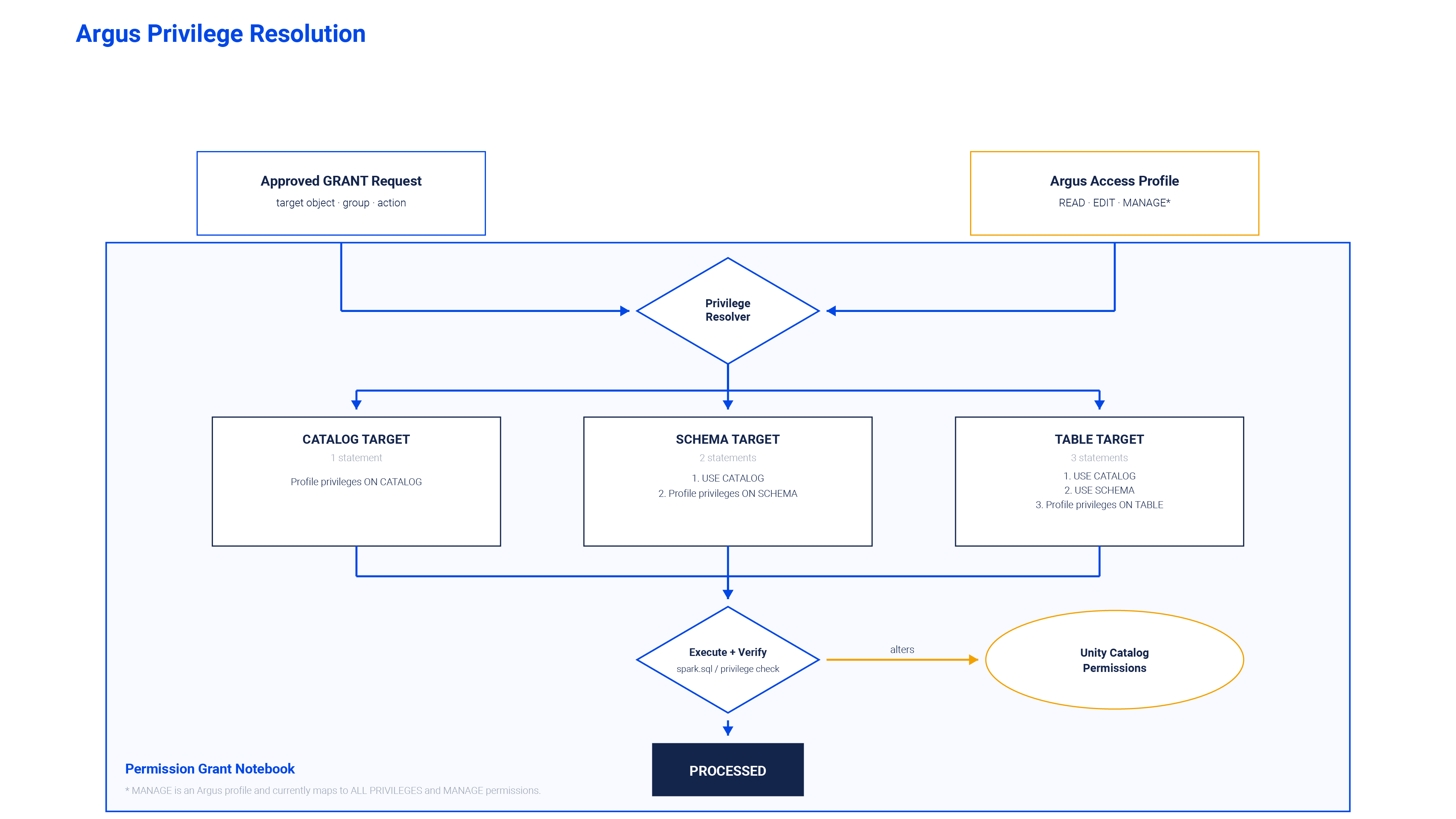
The revoke builder follows a deliberately narrower rule: it removes the mapped privileges from the requested object but does not remove parent-level USE CATALOG or USE SCHEMA grants. Those prerequisites may still be required to reach other resources. This also means that an object-level revoke cannot negate access inherited from a parent catalog or schema; inherited access must be changed at the level where it was granted. A related consequence is that profiles overlap: READ's privileges are a subset of EDIT's, so revoking one profile removes privileges the other may still legitimately cover. Revoking EDIT from a group that also holds an approved READ removes SELECT along with the editing privileges; restoring the intended state requires re-granting the remaining profile. Profile-aware revocation subtracting only the privileges not covered by another active grant is a candidate refinement for the enforcement layer.
Enforcement is performed only for rows in APPROVED state. The notebook builds the appropriate statements, executes them sequentially through spark.sql(), and verifies the resulting state with SHOW GRANTS. Grant verification checks both the target privileges and its traversal prerequisites. Revoke verification confirms that the mapped target privileges are absent.
Listing 5. Request Processing in the permission_grant.py notebook
Only requests that pass verification are included in the final bulk update to PROCESSED. An exception or failed verification leaves the row in APPROVED, allowing the next scheduled run to retry it. This produces an at-least-once processing model: SQL generation must be safe to repeat, and verification determines whether the lifecycle can advance.
Deploying Argus with Declarative Automation Bundles
Argus is packaged as a single Databricks Declarative Automation Bundle, formerly known as a Databricks Asset Bundle. The bundle defines the application and its enforcement workflow as version-controlled resources while allowing environment-specific values to be supplied for sandbox and production targets. Its value is not simply reducing deployment steps; it makes the separation between user interaction and privileged execution reproducible.
The bundle deploys two independently secured runtime components. The Databricks App hosts the request, approval, management, and tracking interfaces and connects to its SQL warehouse with CAN USE. The permission-processing workflow runs separately and is the only component authorized to translate approved requests into Unity Catalog changes. Packaging both components together ensures that the application source, workflow definition, schedule, runtime parameters, warehouse attachment, and execution identities evolve as a consistent deployment unit without giving both components the same authority.
Each deployment target supplies the governance catalog, fully qualified request-table name, SQL warehouse ID, application name, and workflow service principal. Optional configuration controls the processing schedule, time zone, paused state, and notification routing through Slack, Microsoft Teams, email, or multiple channels. The processing task uses serverless notebook compute where available because no cluster is declared in its resource definition.
That service principal requires USE CATALOG and USE SCHEMA on the operational table’s parent catalog and schema, together with SELECT and MODIFY on the table itself. It also requires ownership or MANAGE only on the Unity Catalog scopes that Argus is permitted to change.A sandbox target may run as the deployer for development convenience, but that behavior should not be carried into production.

After deployment, the workspace exposes the two expected resources: the data-access portal and the scheduled permission-processing job.
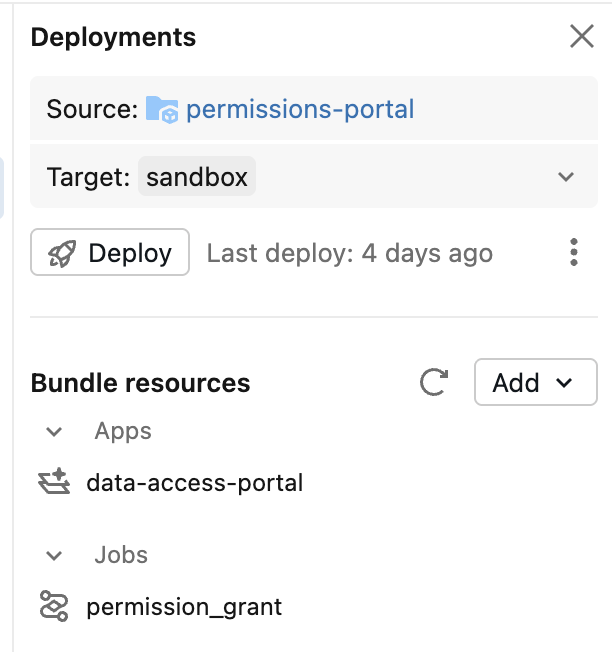
One implementation constraint remains in the current deployment. The repository retains app.yml as a runtime configuration fallback because the tested CLI version did not reliably propagate the bundle’s inline application environment. Until generated application configuration is validated, deployment variables and the runtime file must be maintained consistently. Resolving that duplication is a production-hardening task, but it does not change the separation between application and enforcement identities.
Operational Outcomes
Argus turns a fragmented process into a shared operational record. Requests, justifications, owners, decisions, comments, lifecycle states, and processing timestamps are stored in a governed Delta table. Consumers follow their requests through My Requests without contacting the Data Platform team for status updates, while data owners make decisions for resources whose purpose and sensitivity they understand. Pre-approved changes registered through the management module enter the same processing and auditing lifecycle, so changes initiated outside the standard request path remain visible.
The result is a clearer separation of responsibilities. Data owners determine whether access is appropriate. The Data Platform team defines the available access profiles, their underlying Unity Catalog privileges, the execution schedule, and the identities authorized to enforce changes. Auditors can query the resulting operational history and correlate the business decision recorded by Argus with the permission event recorded in Unity Catalog audit logs.
Limitations and Next Steps
Argus currently records that access was granted, but not for how long it should remain valid. Grants have no expiration date, and there is no recertification cycle prompting owners to periodically reconfirm that existing access is still appropriate. For a workflow whose purpose is auditability, this is the most significant gap: the operational table can answer who received access, why, and who approved it, but not whether that access should still exist today. Introducing time-bound grants an optional expiry recorded at approval and enforced by the same scheduled workflow through a corresponding REVOKE and owner-driven access reviews are therefore naturally the next directions for future development.
Argus also supports access requests only for groups, not individual users. A future module could introduce user-level requests when this functionality is enabled by the application manager.
The application's configuration parameters require further refinement as well. Integrating Databricks Secrets would provide more secure handling of sensitive configuration values and establish a stronger foundation for future development. Operational hardening is also planned, most importantly structured logging and alerting so that a failed enforcement attempt is surfaced rather than silently retried.
Additional capabilities under consideration include managing PII and PHI masking policies and row-level access through Argus, further expanding the application as a permission-management system. Using the application interface to support contributions to a Data Dictionary is another potential direction.
Conclusion
A GRANT or REVOKE statement is only the final technical action in an access-management process. The greater challenge is ensuring that the decision behind it has a clear requester, an appropriate owner, sufficient business context, a controlled execution path, and an auditable outcome. Argus brings those requirements together with capabilities already available within the Databricks platform: a Databricks App for requesting and reviewing access, a governed Delta table for the operational history, application-level profiles that abstract Unity Catalog's privilege graph, and a separate workflow that applies approved changes through a controlled identity an opinionated operational process built around Unity Catalog's ownership, privilege, and auditing foundations rather than a replacement for them.
More broadly, the architecture shows that decentralizing access decisions does not require decentralizing privileged execution. The final permission change may still be a GRANT or REVOKE statement, but governance is the process that makes that statement explainable, auditable, and defensible.